Accurate AI answers start with reliable company data
If you launch an AI customer service employee using incomplete or contradictory information, the model cannot fix the source of the problem by guessing.
Ask a simple question: If you hired a new customer-service employee tomorrow, what information would they need to answer correctly on their first day?
That same information is the foundation of a useful AI knowledge base.
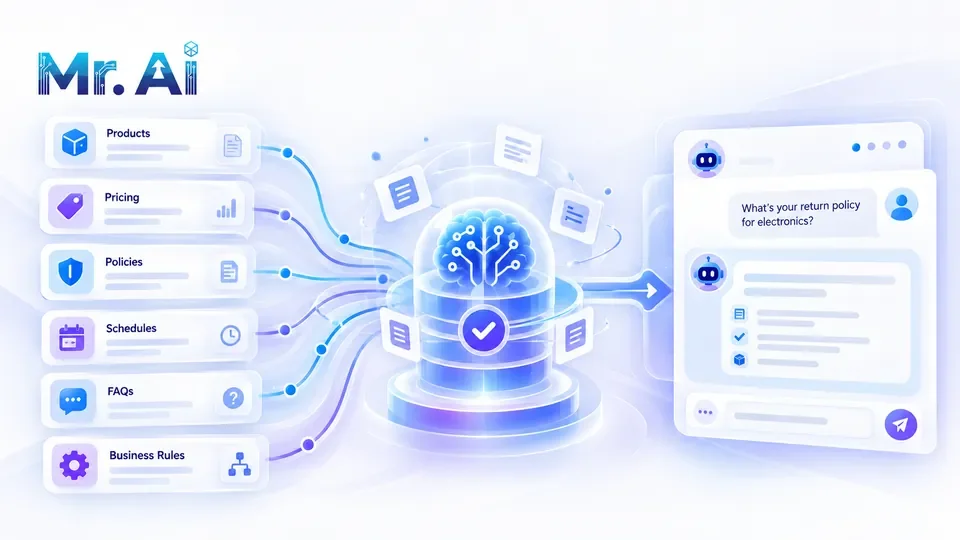
1. Products and services
For each offering, record its official name, clear description, suitable customer, current fixed price (if any), what is included, options or packages, availability, duration, requirements and correct website or booking link.
Avoid empty claims such as "the best in the market" in an operational knowledge base. Record usable facts and conditions instead.
2. Prices and quotations
Pricing is among the easiest places for old data to create problems.
Include:
- Current price and currency.
- Tax, fees and exclusions.
- Last verified update.
- Cases requiring a custom quotation.
- Who may approve a discount or special offer.
If two files contain conflicting prices, establish one authoritative source. Do not expect the AI to decide which is correct.
3. Payment, cancellation and refund rules
Document accepted payment methods, installment conditions if relevant, deposits, refund timelines, exceptions, cancellation policies and required documents.
Have the responsible team review the rules before publishing them. These details directly influence customer expectations.
4. Working hours and service delivery
Gather business hours, holidays, response commitments if formally defined, delivery times, coverage areas and any schedule specific to a branch or service.
Time-sensitive facts need a clear update process. A schedule that was accurate last month may not be accurate today.
5. Frequently asked questions from real conversations
Do not invent an FAQ based only on what you assume people will ask.
Use actual customer questions. For each one:
- Preserve a natural version of the question.
- Write the verified answer.
- Include conditions and exceptions.
- Specify when a human needs to step in.
This makes the knowledge base useful in realistic rather than idealized conversations.
6. Define what the AI does not know or cannot do
This is as important as documenting the right answers.
Record missing information, decisions requiring authorization, promises the system cannot make, cases needing specialist review, sensitive details the assistant should not request, and questions that need verification.
An explicit boundary is more useful than a confident but invented answer.
7. Define human handoff scenarios
Human intervention triggers might include an unusual discount request, complaint, payment dispute, conflicting data, a request to speak with a manager, an unavailable answer or a medical, legal or financial question requiring a qualified professional.
Define who receives each category and what context should be passed along.
8. Test using real customer questions
Before launch, build a privacy-safe test set of around 20 to 50 real questions. This is a suggested starting test size, not a universal benchmark.
Include easy and multi-part requests, local dialect, spelling errors, questions without an answer, follow-up situations and human-handoff cases.
For each failure, identify whether the root problem is bad company data, instructions, retrieval logic or missing operational rules.
A demo consisting only of three perfect questions is not a reliable quality check.
9. Give each information category an owner
Data becomes stale when everybody assumes someone else is responsible.
Assign an owner for pricing, products, policies, schedules, delivery, promotions and the FAQ. When a fact changes, updating the AI knowledge base should be part of the normal business process, not an optional afterthought.
10. Review and improve regularly
Track unanswered questions, facts corrected by employees and frequently changing information. Turn those findings into an improvement backlog.
You do not need thousands of pages to start. A small, accurate, actively maintained source can be more useful than a large collection of contradictory files.
A simple knowledge-base readiness checklist
Before going live, confirm that current prices have an owner, refund rules are approved, working hours are updated, real customer questions have verified answers, no-answer behavior is specified, handoff triggers exist and the team has tested representative conversation scenarios.
If one item is missing, resolve it before letting the agent answer that category without supervision.
How Mr. AI uses this data
According to the current company website, Mr. AI allows businesses to add company knowledge and configuration, test an AI employee before using it with real customers and keep updating knowledge as operations change.
Current supported channels include WhatsApp, Facebook Messenger and website chat. The team remains responsible for oversight and intervention when needed.
To prepare your company's information before launch, try the customer experience or book a session with the team.